I am an ardent believer of backups. My desktop computer is backed up nightly to an external usb drive using a program called Back In Time. It uses the famous rsync program to do the backups. The neat thing about rsync, is that it uses hard links to link to previously backedup files that have not changed. What this means, is that if a file does not change, it is not copied multiple times to the hard drive, but just once. This saves a very large amount of disk space, while preserving the original directory structure. Back In Time is started though a cron job, and as long as the desktop computer is on, it will be backed up. By the way, my computers run with the UBUNTU Linux operating system. These instructions are for Linux and will not work on Windows systems. My laptop us running Ubuntu 11.10, and my server is running Ubuntu 10.04.3 LTS. Check out Ubuntu Linux at ubuntu.com.
The setup for my desktop will not work for my laptop. My laptop is not always on, and is not always available around the home network to be backed up. I needed a system that would automatically backup my laptop whenever it is on, but only once a day. I have been doing manual backups, but that is a hassle. I may eventually employ this backup method to my desktop so I don’t have to keep it on all the time either.
Here are a couple of problems I needed to overcome. If I mounted a server drive from my laptop, and backup remotely to the server, rsync would not preserver the hard links. This not only takes up a lot of disk space, but every file would need to be sent over to the server during every backup. Over wifi, a typical backup would take longer than a day. Not ideal for a daily backup. I therefore, had to initiate the backup from the server. This meant, sshing into the server, mounting the laptop as a drive in the server, and starting the backup from the server end.
I searched for solutions to these problems, and came up with a multitude of answers that were not particularly ideal for me to impliment. One solution was to use NFS to mount the drives in fstab. I did not want to put it in fstab because, I did not want it to mount automatically when the server booted (or the laptop for that matter). Another solution was to continuously poll for the existance of the laptop, from the server, and when it ‘appeared on the network’, start a backup. I then would have to keep track of it to make sure it was only backed up once a day. None of these solutions suited me well.
What I did…
Through a bit of more studying and searching, I discovered that a remote script can be run by ssh. I use ssh all the time to connect to my server, and finding that I was able to start a script on the server just by initiating an ssh session was a revelation to me.
Another tool that I found was “anacron“. Anacron is kind of like cron, but enables you to run something x number of days, weeks or months. And, if the computer is not running at midnight, anacron will make sure the program will run sometime during that day as long as the computer is on sometime in that day. Unlike cron, anacron does not enable you to run a program multiple times a day, or at exact times. This is exactly what I was looking for and anacron was already installed on my laptop, and was already set up to run upon boot.
This is not exactly a step by step tutorial, as you need to know how to get around your system, and run things as root.
I wanted the backup process to be automatic, so I needed to set up ssh keys. I have never set up ssh keys before. There are a lot of tutorials on the net to help along; and I picked this one: http://news.softpedia.com/news/How-to-Use-RSA-Key-for-SSH-Authentication-38599.shtml
This is the command to generate the keys. I wanted unattended backups, so I did not enter a passphrase.
# ssh-keygen -t rsa
I also ran these commands to copy the files to the appropriate directories and files:
# scp .ssh/id_rsa.pub username@hostname.com:~
# cd $HOME
# cat id_rsa.pub >> .ssh/authorized_keys
I also had to copy the keys from the .ssh directory in my home directory to the .ssh diretory in the /root directory.
*** EDIT 11/3/2012 *** I updated my operating system, and neglected the above step. The backups failed, and I really scratched my head wondering why. Anacron (see below) is run as root, so it is imperative that the ssh keys be placed in the /root/.ssh/ folder.
*** EDIT 7/29/2023 *** I still use this same routine to backup my laptop over a decade later. A new command (to me) that I found is “ssh-copy-id username@remote_host” This copies the public rsa key to the server and adds it to the “authorized_keys”. If you have a root password on your server, you can use the command “ssh-copy-id root@remote_host”. Otherwise use the commands listed above (copied here):
# scp .ssh/id_rsa.pub username@hostname.com:~
ssh into the server
# ssh username@hostname.com
# sudo su
# cat /home/username/.ssh/id_rsa.pub >> /root/.ssh/authorized_keys
Read over the ssh tutorial sited above, and when you are done you should be able to ssh into your server with:
# ssh username@remote.hostname.com
I like sshfs to mount my remote directories.
if it is not installed on your server, do it by running:
# sudo apt-get install sshfs
or find it in the Ubuntu Software Center.
You will also need a recent version of Back In Time. I have v1.0.8 installed. The difference between the newest version and older ones, is that the newer version can have multiple profiles. That is, you can have a different profile for each computer you want to back up from your common point (server).
I added the Back In Time stable repository ppa. This will give you the latest and greatest version of Back In Time. If you don’t need multiple profiles, you can install Back In Time from the Ubuntu Software Center and it will be fine. Do this command to add the repository:
# sudo apt-add-repository ppa:bit-team/stable
Then do:
# sudo apt-get update
# sudo apt-get install backintime-gnome
Some explaination is needed here that probably should have been mentioned sooner. My server has ubuntu-desktop installed on it (that is, a full gui interface). The Back In Time profile configuration is easily done with the gui. Then the actual backups can be done with the command line. This also means that if you don’t have a server, your desktop computer should work just fine to backup your laptop with these instructions. There is nothing really “servery” about the process.
OK, some preliminary work:
You need to make a mount point on your server where you want to mount your laptop drive. Create a blank directory where you want it mounted. I chose “/home/ubuntu-laptop” as my mount point.
Create directories on your laptop and on the server where you want the script files to go. On my laptop, I put my backup script in “/home/myhome/Scripts_and_Programs/server_backup”. You can put yours where ever you want. On my server I put the script in “/home/myhome/Scripts”.
I use static ip addresses for my home network devices. You can set up a static ip for your laptop and server in the network manager, but I chose to let the rounter do it. My router lets me pick a certain ip to be assigned by its DHCP. It is based off the mac address of my laptop wifi connection and my server eithernet card. My laptop is assigned 192.168.1.5 and my server is 192.168.1.11. By letting the rounter assign the addresses, I am free to take my laptop somewhere else, and some other wifi rounter will be free to assign my laptop any address it needs to.
Test your connections. ssh into your server. If your ssh keys were setup correctly, a command like:
# ssh -X myname@192.168.1.11
should work, and no password is necessary. On your first connection, you may be asked to accept the key. Answer “yes” and proceede.
Now, try to mount your laptop drive from your server. My command to do this is:
# sshfs myname@192.168.1.5:/home /home/ubuntu-laptop
If you go to “/home/ubuntu-laptop”, on your sever, you should now see your laptop files. Again, the first time you do this, you may be asked to accept the ssh keys. You will also be asked for your laptop password. You could set up another set of ssh keys for your server if you would like, but the sshfs command has an option to get your password from somewhere else and that is how I did it. That will be explained later.
If all is well up to this point, you can fire up the Back In Time gui to configure your backup. On the command line, the command to enter is “backintime-gnome”. You still should be ssh’ed into your server, or be at a server terminal. Notice that my ssh command from above has the option -X in it. This will allow X display forwarding so you can run a gui program from your terminal box.
in your ssh’ed terminal box, that is connected to your server, type:
# backintime-gnome
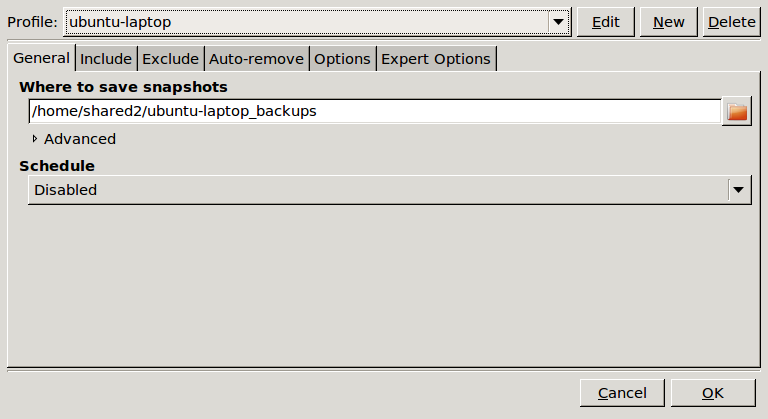
This should bring up the Back In Time gui, ready to configure. Click the “settings” icon on the Back In Time gui. If you are using a newer version of Back In Time, you can select a “New” profile. Mine is called “ubuntu-laptop”. Then you need to decide where to put your backups. I have a usb drive mounted at /home/shared2. You need to traverse to the point where you want your backups to go using the folder icon to the right of “Where to save snapshots”. Leave “Schedule” disabled as this will be handled in one of the script files.
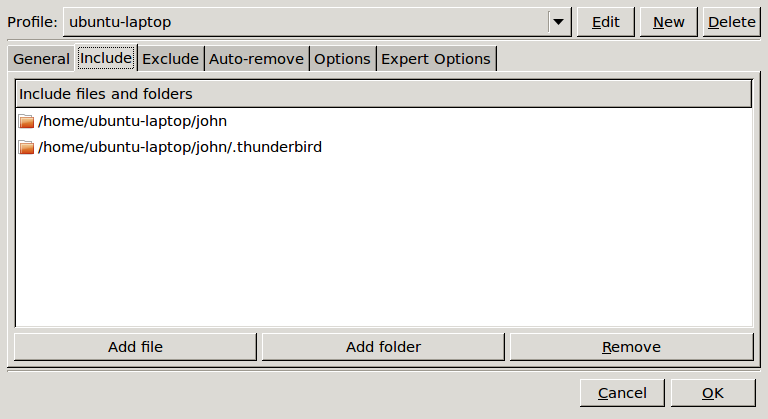
Click the “Include” tab and add the folders you want backed up. Remember that I have my laptop mounted at /home/myname/ubuntu-laptop on my server. This is where you need to go to include the included folders. Notice I have a seperate entry for my Thunderbird email folders. This is because I have any hidden files .* excluded from being backup up and my Thunderbird email folders are inside a hidden directory.
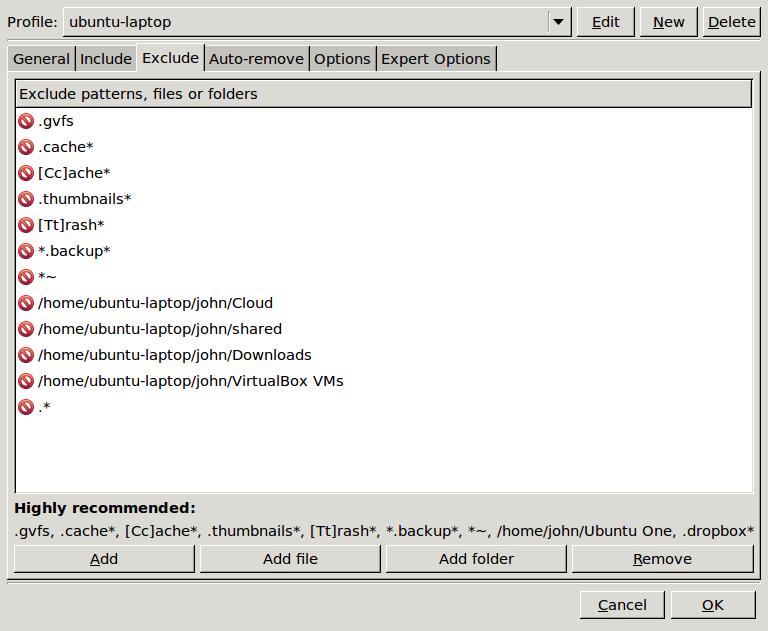
Click the “Exclude” tab. Add any files or folders you do not want backed up. As you can see, I added an entry to skip all my configuration files with .* . You need to decide what you want backed up. I also excluded my download directory, my virtual machines folder (large files for experimentation only), and any other directories where I might have other systems mounted in.
Click the “Auto-remove” tab and decide how many backups to want to retain.
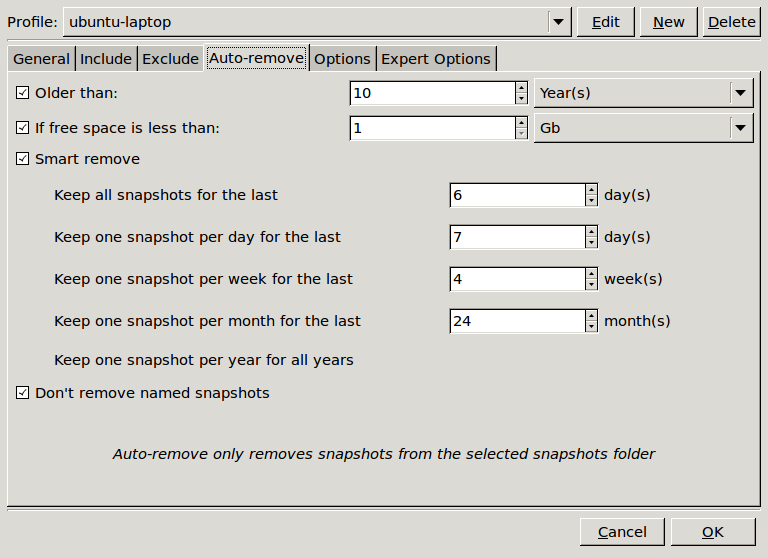
Click the “Options” tab. I added one checkmark here that was not already checked. I checked “Continue on errors (Keep incomplete snapshots). I did this because I had a snapshot fail because of some protected .files. I suggest you click this box, at least at first. Then after you make backups, you can look at the log file to see what failed. Otherwise, you will never get a backup if there is an error somewhere.

I did not adjust any of the “Expert Options”.
Click “ok” and this should bring you back to the main “Back In Time” window. If you like, you can make your initial backup by pressing “take snapshot” icon. Your first backup may take a good amount of time, depending on your wifi connection, and the size of your backup. Mine included many video files, and took well over a day and a half. Subsequent backups are quite quick, depending on what new or changed files your need backed up.
If all is successful to this point, you can close the “Back In Time” gui. I suggest you wait until your initial backup is done, as the backup will continue even after you shut the gui, but this may cause problems when you try to setup the rest of the system.
Now the meat and potatoes:
This is the script “start_laptop_backup.sh” that is run on the laptop side, to initiate the backup.
#!/bin/sh
# Automated backup of laptop, that is not always on, to a server that is always on.
# By: John McDougall
# Aug. 11, 2011
#
# This is a script that is run on the laptop. It starts a script on the server named backup_ubuntu-laptop.sh
#
# Is the server pingable?
# try three pings, wait maximum one sec for reply, be quiet
echo “Starting laptop side script”
echo “testing to see if server is accessable”
if ping -qc 3 -W 1 192.168.1.11 > /dev/null; then
echo “yes… Server is up. Will now attempt backup”
echo “Connecting to server.”
ssh -X john@192.168.1.11 /home/john/Scripts/backup_ubuntu-laptop.sh
echo “Server disconnected… Closing laptop side script”
else
echo “no… Server is down. No backup done now”
fi
This is what this script does: First, I try to ping my server to see if is available. If it passes that test, I connect to the server over ssh and run the script “backup_ubuntu-laptop.sh”. No password needed if the ssh keys are set up properly.
Here is the script on the server side called “backup_ubuntu-laptop.sh”.
#!/bin/bash
# Automated backup of laptop, that is not always on, to a server that is always on.
# By: John McDougall
# McDougallsHome.net and radio.McDougallsHome.net
# Aug. 11, 2011
#
# This is a script that is run on the server. It is started from a script run through ssh from the laptop to be backed up.
#
# Connect to ubuntu-laptop from server.
echo “Successfully connected to server… Running server side script”
echo “Attempting to mount ubuntu-laptop to server”
sshfs -o password_stdin john@ubuntu-laptop:/home /home/ubuntu-laptop < /home/john/Scripts/ubuntu_pwd
echo $1
for i in `cat /proc/mounts | cut -d’ ‘ -f2`; do
if [ “x/home/ubuntu-laptop” = “x$i” ]; then
echo “laptop is mounted. ”
# Start Backintime
echo “Starting backintime”
# backintime –backup
backintime –profile ubuntu-laptop –backup
echo “Backup finished”
echo “Unmounting ubuntu-laptop”
fusermount -u /home/ubuntu-laptop
echo “ubuntu-laptop unmounted. Exiting backup script and disconnecting from server”
exit
fi
done
echo “laptop not mounted… Can not backup”
exit
This script first mounts the laptop via sshfs. Notice the “-o password_stdin” option. This enables the password to be entered from another source. In this example, I have the password in a file called laptop_pwd in my Scripts directory on the server. As mentioned earlier, you could set up ssh keys for the server and eliminate the password in a file thing if you feel that is unsafe to do.
This script then confirms that the laptop is indeed mounted. It then initiates the backup with the command “backintime –profile ubuntu-laptop –backup”. After the backup is finished, the script unmounts the laptop and closes down.
To test all this, open a terminal window on your laptop and start the script “start_laptop_backup.sh” and watch its progress. If all worked out, and you already made an initial backup, it should run relatively quick.
Now to automate it all with anacron:
You can find a little tutorial on anacron at “http://www.thegeekstuff.com/2011/05/anacron-examples/“.
To configure anacron, you must modify the file /etc/anacrontab on your laptop. I did this in a terminal window using the command:
# sudo nano /etc/anacrontab
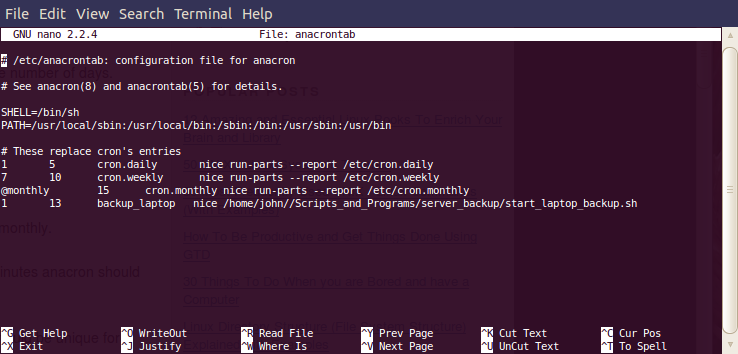
I added one line to the bottom of the anacrontab file as shown above. The first parameter “1” means it should be run once a day. The second parameter “13” means it will start approximately 13 minutes after the machine is booted. You can change this to whatever you want. Set it at a time where it won’t interfere with the busy boot process, and anything else you might do as soon as you turn on your computer. The third paramater is a label you make up to identify this process. The fourth parameter is the command to execute. By placing “nice” before the command, if the system is very busy, the backup process will wait until the system is less busy. You can look up the manual page for “nice” by typing “man nice” in a terminal window.
That about does it. If everything worked so far, you are ready to reboot your computer. Anacron should run and a backup initiated. Anacron will only run once a day even if the laptop is turned on several times a day, or left on for days. You will still only have one backup per day. You can look at the files in /var/spool/anacron. ubuntu-laptop (or what ever label you used in the anacrontab file) should be listed there. Open it up with nano or gedit, and it should list the last date that line in the anacrontab file was executed.
I hope this post helps you in your laptop backup. It might seem kind of complicated, but I enjoyed the process of learning and figuring it all out. Have fun in exploring linux!
John – K7JM
 I purchased the